Live meeting assistant · macOS & Windows
Undetectable AI for your live calls.
Live guidance on your screen while the question is still being asked. No bot joins the call, and nothing shows up in screen shares.
Free plan with 3 sessions every month · No card required
How it works
Real-time help, from hello to follow-up
Never miss a word
Live transcription of the whole call, from your mic and the call audio, with every speaker tracked and the language detected automatically. You get the full conversation, not just your half of it.
Answers before you ask
When a question comes up, talking points and a clear structure appear in an overlay only you can see. There is no hotkey to press and no prompt to type.
Walk away with the recap
When the call ends the summary is already written, with the decisions, the action items, and who owns each one.
The film
See it before you install it
One call from start to finish: the question, the answer, and the write-up waiting when you hang up.
During, not after
Notetakers tell you what happened.
Assistly is a heads-up display for the call you’re still in.
You still get the recap afterward. It is no longer the only thing you get.
Without a trace
Undetectable in every way
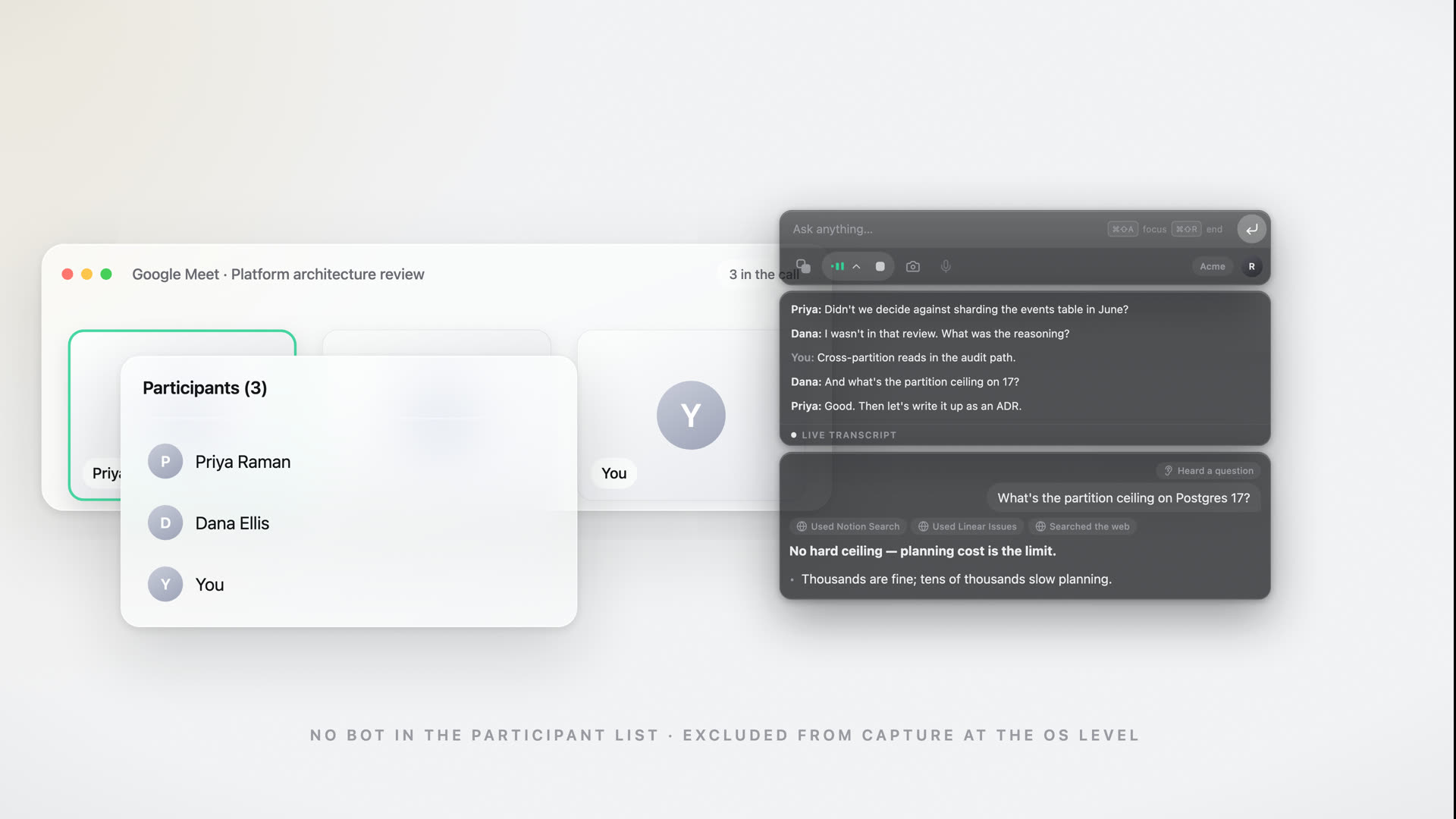
Nothing joins your call, nothing announces itself, nothing shows up in a share or recording. Everyone else just sees you, on your game.
- ›
- ›
- ›
Drag the handle — the Assistly window sits on your screen only, never in the shared frame.
No bot on the guest list
Assistly works straight from your computer's audio, so nothing ever joins the call or shows up in the participant list.
Moves where you need it
The overlay floats on your screen alone — nudge it anywhere with a keystroke, right where you're looking.
Nothing to integrate
No meeting-app plugin, no calendar hookup, nothing wired into the call — which is why it works with every call app.
Works with every call app





 Phone calls
Zoom, Google Meet, Teams, Webex, Slack huddles, and ordinary phone calls. Assistly works from your computer's audio, so there is nothing to integrate and no bot to invite.
Context & connections
Grounded in your world
Assistly connects to the tools your work already lives in and carries context from call to call, so the guidance is built on your calendar, your docs, and every session before this one.
- Start every call prepared. Connect Google Calendar and each session starts knowing who is on the call and what it is about.
- Bring Slack into memory. Add @Assistly to a channel and you can ask about what was said there, with a link to the message. Every recap posts to the channel you choose. Available on Enterprise plans for now, and coming to everyone soon.
- Pull from your real docs. Connect Notion, Linear, or any MCP server, and guidance draws on your real docs and tickets.
- Keep context between calls. What is said in one session carries into the next. Nothing resets when you hang up.
- Ask your notes anything. Ask about past sessions in plain language and get a direct answer with its source.
- Ask from anywhere. Connect Assistly to Claude, ChatGPT, or Cursor and ask about your calls without leaving them.
What did we agree with Northwind last week?
You committed to a 12-day rollout and a SOC 2 report before their board review.
Pulling from
Features
Built for live conversation
Help arrives hands-free
Auto-assist is on from the first word. When someone asks you something, or you think out loud, the response is already in your thread. No hotkey, no prompt.
Every speaker, kept straight
Your voice, their voices, and who said what, tracked across the whole call from the call's own audio rather than just your mic. The guidance addresses the right person whether you use headphones or a speaker.
Fluent in your language
Dozens of languages, detected automatically, even when the call switches mid-sentence. Guidance arrives in clear English, which helps a lot if English is not your first language.
Filed before the call ends
Create a project for each client, deal, or search, and sessions file themselves, because the calendar tells Assistly where each call belongs. Answers stay inside the active project, so nothing crosses between clients.
Talk instead of typing
Hold Control and Option (Ctrl+Alt on Windows) and say it. In a text field, the words land cleaned up, with filler removed, lists as lists, and corrections applied. Anywhere else, you are asking Assistly.
Sounds like you
Build a persona from your CV, docs, and notes, then switch modes for a sales call, a client review, or an interview round. Every response draws on your material and is phrased the way you would say it.
After every session
The notes write themselves
When your call ends, Assistly turns the transcript into a short summary and a list of action items, with who owns what and by when, so you leave every conversation with a plan.
- A short summary of what was decided
- Action items with owners, pulled from the discussion
- Auto-saved and searchable across all your sessions
The team agreed to a phased rollout starting with the EU region, pending the data-migration review. Pricing for the enterprise tier was confirmed at the higher band.
- Send the migration timeline to Priya by ThursdayYou
- Draft the phased-rollout plan for reviewYou
- Confirm SOC 2 report can be shared with the prospectMarcus
- Lock enterprise pricing in the proposalTeam
Projects
Every client, its own memory
Create a project for each client, deal, or search, and every call is filed where it belongs, from the calendar rather than by you. Until you create one, everything lives in General and the feature stays out of your way.
- Calls file themselves. Tell a project which meeting, people, and company it covers, picked from your recent calls. When the calendar says a call belongs to another client, a notice offers the switch in one tap.
- Ask Acme Corp anything. Answers and history search stay inside the active project. On a call, lookups search that client's calls first, with citations.
- Ask before you dial. Ask the project where you left things and get the answer from its calls, with the meeting it came from cited.
Nothing to organize by hand, and nothing shared across clients.
This call matches Globex
SwitchDismissAcme needs staging access before the Sept 1 board review. You owe them credentials.
Use cases
One assistant for every conversation that matters
Be the most prepared person in the room
Assistly follows the discussion and gives you the facts, definitions, and a good next question, then sends a recap with action items. For client work, each engagement keeps its own project, so every answer comes from that client's calls.
Stay confident and on-message
Objection handling, pricing, and competitor comparisons show up live, so you are not caught off guard on the call. A project per deal keeps every conversation with the account in one place.
Keep up when everyone's talking
Assistly tracks every speaker on a busy call and keeps the context straight, so you always know what was just asked and who asked it.
Stay structured under pressure
From behavioral prompts to deep technical questions, you get a clear structure and talking points as the question is asked, with modes for behavioral, coding, and system-design rounds. If you are the one hiring, a project per role keeps every candidate call together.
Pricing
Start free. Go unlimited.
Every plan includes every feature, with no add-ons. You only choose how much you want to use it, and whether your team shares a workspace.
Free
3 sessions / month · 15 min each
Everything you need to use Assistly in real conversations.
Pro
billed annually ($108), or $14.99/mo billed monthly
Unlimited sessions · no time cap
For people who use Assistly every week.
Enterprise
Team spaces · admin controls · SSO
For teams that want one shared memory across every client and deal.
Start on Free, no card required. Upgrade or cancel anytime. Rolling it out to a team? See Assistly for Enterprise.
Every plan includes
Why Assistly
The difference, line by line
“Bots & notetakers” covers recording bots and post-call note tools. Capabilities vary by product.
FAQ
Questions, answered
Does a bot join my call?+
No. Assistly never joins the meeting, never appears in the participant list, and never announces itself. It is a desktop overlay that works from your computer's audio, so it runs alongside Zoom, Meet, Teams, Webex, Slack huddles, and ordinary phone calls, with nothing to integrate and no bot to invite.
Do I have to ask it for help?+
No. Auto-assist is on by default. When the other side asks you something, or you think out loud, the response appears in your thread on its own. You can also drive it with hotkeys if you prefer, but on a live call the help is there when the question is asked.
Does it show up in screen shares or recordings?+
No. The overlay is excluded from screen capture at the OS level, so it never appears in a screen share or a recording on Zoom, Meet, Teams, or anything else. It stays on your screen alone, and everyone else sees the same meeting without the assistant.
Does it work if everyone's talking, or if I wear headphones?+
Both. Assistly captures the call's own audio, not just your microphone, so it follows the conversation whether you are on speaker or wearing headphones. It also separates your voice from the other participants and tracks multiple speakers, so it keeps context straight on a busy group call.
Does it actually know who I am?+
Yes. Build a persona from your CV, notes, and docs, and Assistly tailors every response to your background, role, and the way you talk, so its guidance sounds like you rather than a generic assistant.
Does it work in other languages?+
Yes. Assistly detects the language being spoken with no setup and understands dozens of languages, so it keeps up when the conversation is not in English or switches languages mid-call. It gives you its guidance in English, which helps if English is not your first language in interviews, calls, and meetings.
Does it work with Slack?+
Yes. Connect Slack and each session's recap, with its summary, key points, and action items, posts to a channel you choose, either automatically or one session at a time. In Slack, mention Assistly, message it, or type /assistly to ask about your meetings. It reads the thread it was asked in, so it knows what is being discussed. Any channel you add @Assistly to becomes part of your memory, cited like a meeting with a link back to the message. Only channel members who have connected Assistly can search it, and removing the bot deletes what it read. Slack is on Enterprise plans for now and coming to everyone soon.
Can it read my calendar?+
Read-only, if you connect Google Calendar. The overlay shows what is next with a Join button that opens the call and starts listening. The session then knows who is on the call, so names are spelled right, and opens with a brief from your earlier sessions with the same people. Disconnect any time from Integrations.
How is my data handled?+
Audio from your mic and the call streams securely to the cloud, where it's transcribed and processed to power real-time guidance. You control how long sessions and notes are kept, and you can delete them at any time.
What does it run on?+
Assistly is a native, always-on-top app for macOS (Apple silicon) and Windows 10/11. It works alongside Zoom, Google Meet, Microsoft Teams, Webex, Slack huddles, and ordinary phone calls, or anything else playing through your computer's audio.
What do I get after a session?+
An organized summary plus a clear list of action items, saved automatically to your notes and synced to the session timeline so nothing slips through.
Do I have to organize my sessions?+
No. Everything lives in General by default, and if you never create a project the feature stays out of your way entirely. Create one for a client, a deal, or a search, and pick the meetings, people, or company it covers from a list of your recent calls. After that, calls file themselves. When the calendar says a call belongs to a different project, a notice offers the switch in one tap. Nothing is added behind your back, and there is nothing to sort by hand.
Can one project's answers draw on another project's calls?+
No. Answers and history search stay inside the active project. Ask your Acme project a question and it draws on Acme's sessions, with citations, and not on another client's. That holds during a call too: if the answer is in another project, Assistly says it found nothing in Acme rather than reaching for it. To search everything, ask from History with no project selected. Nothing crosses between clients.
Can I use my meetings in Claude or ChatGPT?+
Yes. Assistly runs an MCP server, so you can connect it to Claude, Claude Code, ChatGPT, Cursor, Codex, or any other MCP client and ask about your past calls from inside them, such as what you agreed on pricing with Acme or what you have committed to and not done. Setup is one URL with no API key: your app opens a browser, you sign in and approve. Access is read-only, so a connected app can read your recaps, transcripts, and action items but cannot change or delete anything, and you can disconnect it at any time.
How does pricing work?+
Every plan includes the full feature set. Free gives you 3 sessions a month, capped at 15 minutes each. Pro is $14.99 a month, or $9 a month billed annually, for unlimited sessions with no time cap. Enterprise adds the shared team workspace, admin controls, and a rollout we run with you. It is priced per seat, so talk to us. You can upgrade or cancel anytime.
Free to start · No card required
Put Assistly in your corner
Create your free account and walk into every meeting, call, and interview with live guidance and notes that write themselves. The app installs in a couple of minutes on macOS and Windows.
Free plan with 3 sessions every month · No card required · macOS & Windows